
ATG Search - how to define the search configuration rules

ATG Search configuration rules are specified through the ATG BCC Merchandising UI. Over here you could specify the below set of rules
  1. Redirection rules --> If you want to redirect to another page other than the search result page for a search keyword
  2. Property Prioritization rules  --> Prioritize certain set of properties and give weightage
  3. Result exclusion rules  --> Exclude certain search results
  4. Result positioning rules  --> Position / Sort the search result data


1.  To create the search configuration tree, you need to log-in to the ATG BCC Merchandising UI and select the Search Configuration Tree in the Browse tab drop down. Now need to click the Create button and first you need to create the Search Configuration Folder.


2.  When you create the folder, give the name of the folder and select whether the contents vary by Language or Segment. If your ecommerce site need to support more than one language and you need to configure different locale specific rules, please select the contents vary by Language option.


3.  After you create the folder, you could click the create the Search Configuration button and specify the Name and the Locale. These locale values are populated in the drop down from the component /atg/search/config/LanguageDimensionService


4. Once you create the Search Configuration,  you can add different rules like Redirection, Result Exclusion,...


Below you could find the screen shot of a sample Result Exclusion rule for the searches with search keyword contains all of the words baby.
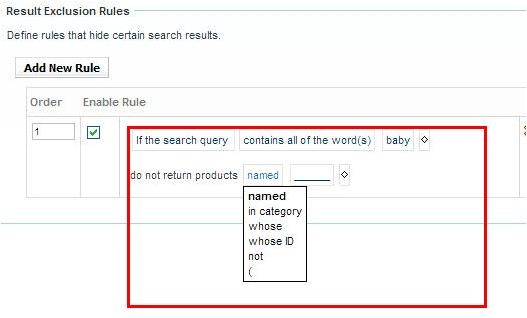

Below you could find the screen shot of a sample Result Positioning rule for the searches with search keyword contains all of the words tv.


Comments

  1. Sony kindly post some more example on Result Positioning rule to understand How it works.

    ReplyDelete
  2. Sorry, I don't have the Search set up now. The result positioning is pretty straight forward and all the matching results will be positioned at the top. If you have any specific queries, please ask.

    ReplyDelete
  3. Hi Sony,

    Need some help. I have successfully configured search rules in /atg/bcc and deployed.
    But on commerce site if I search with that keyword it is not redirecting.
    Any specific reasons.
    Please refer this link to understand the problem better...
    https://kr.forums.oracle.com/forums/thread.jspa?threadID=2423279


    Thanks in Advance.

    ReplyDelete
  4. ATG out of box SearchFormHandler and droplets have an autoRedirect property that specifies whether the form handler should check the search results for a redirect URL or not. Check this

    ReplyDelete
  5. How do I add another keyword that associates with the same one for example "Sharkbite" pull up search results but when entered in "shark bite" separately no results found. I would like to know how to add a word differentiation and make it live.

    ReplyDelete
  6. If you want to get the results of some other word, you can use the dictionary and give some synonyms. Also give "mode=AND" in the request attributes.

    ReplyDelete

Post a Comment

Popular posts from this blog

ATG - more about Forms and Form Handlers

An ATG form is defined by the dsp:form tag, which typically encloses DSP tags that specify form elements, such as dsp:input that provide direct access to Nucleus component properties. Find below a sample dsp:form tag.    <dsp:form action="/testPages/showPersonProperties.jsp" method="post" target="_top">      <p>Name: <dsp:input bean="/samples/Person.name" type="text"/>      <p>Age: <dsp:input bean="/samples/Person.age" type="text" value="30"/>      <p><dsp:input type="submit" bean="/samples/Person.submit"/> value="Click to submit"/>    </dsp:form>   When the user submits the form, the /samples/Person.name property is set to the value entered in the input field.Unlike standard HTML, which requires the name attribute for most input tags; the name attribute is optional for DSP form element tags. If an input tag omits the n...

ATG - basic concepts of ATG

This blog is for the ATG beginners to get some basic overview about ATG. I just given the ATG concepts as a list of numbered points for the ease of understanding. 1. At the framework level, ATG is a               java based application platform for hosting web-based applications, as well as RMI accessible business components,               with an ORM layer,               a component container,               an MVC framework,               and a set of tag libraries for JSP. 2. Art Technology Group(ATG)'s Dynamo Application Server (DAS) is a Java EE compliant application server. DAS is no longer actively developed as ATG recommends using other Java EE applications servers for its products such as BEA WebLogic, JBoss or IBM WebSphere. 3. Prior to ATG 2007, JHTML was used instead of JSP for view purpose. J...

Good features of Eclipse3.5 (Eclipse Galileo) JDT

This blog will list down the new features of Eclipse Galileo JDT. I will write another blog regarding the features of Eclipse Helios and Eclipse Indigo. Read about Eclipse Helios features @  http://tips4ufromsony.blogspot.com/2011/11/good-features-of-eclipse-36-eclipse.html ========================================================== 1. Toggle Breadcrumb —> Will list the name of the file and the method name with respect to your cursor position , on the top of the Eclipse IDE. From here you can go to other methods, other classes in same package , …. Screen shot of Toggle Breadcrumb: ========================================================== 2. From the method call , you can either go to declaration or to implementation Screen shot of implementation call: ========================================================== 3. Advanced Open Type –> You can restrict the open type to a selected Working set only. Screen shot of Advanced Open Type: ==========...

ATG and XML File Combination

              An XML file might appear at several points in the CONFIGPATH. The ATG platform, at runtime,   automatically combines all the XML files in the CONFIGPATH with the same name into a single composite file, which is then used by the appropriate component.               XML files are combined one tag at a time: in other words, tags are matched up, and the combination rules are applied to each pair of matched tags. XML file combination is controlled with an XML attribute named xml-combine. This attribute is used only in the preprocessing stage of XML file combination. The xml-combine attribute can have the following values: xml-combine = "replace" xml-combine = "remove" xml-combine = "append" xml-combine = "append-without-matching" -->  This is the same as  xml-combine="append" , except that embedded tags are not matched and combined recursively. The content is simply appended. ...

Mozilla FireFox - how to add security certificate exception urls

If you visit a web site with a secure connection(https) and if the website's security certificate has some problem like the security certificate presented by the website was not issued by a trusted certificate authority  or  the security certificate has expired or is not yet valid, you will get an error page ( like below in IE ) with an option to continue to this website. When this non secure page is loading, in Internet Explorer, you will get an option to specify whether you need to download the page content files like JS, CSS, Images,... But you will not get such an option in FireFox/Chrome and could see only the text data in this new non secure page. If you are doing some local development with FireFox/Chrome and have such a situation, you might want to override this security restriction. FireFox provides some exception url list in secure certificates menu. Go to Options - Advanced - Encryption - View Certificates and click the exception list and...