Eclipse plug-in to create Class and Sequence diagrams

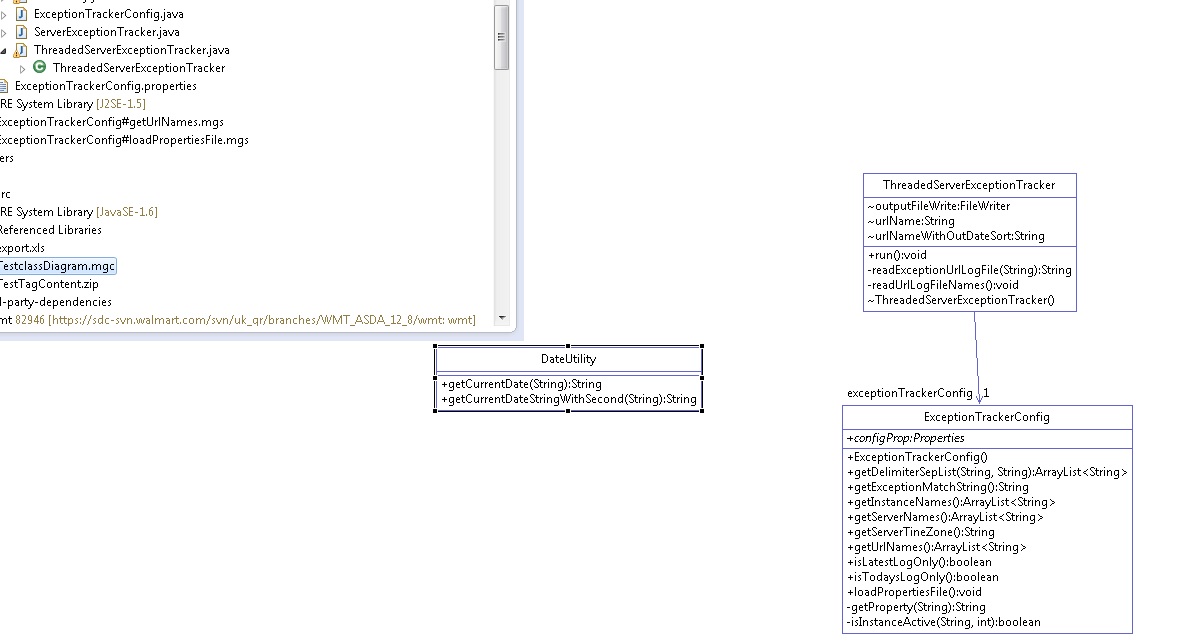
ModelGoon is an Eclipse plug-in avaiable for UML diagram generation from Java code. It can be used to generate Package Dependencies Diagram, Class Diagram, Interaction Diagram and Sequence Diagram.


You coud get it from http://marketplace.eclipse.org/content/modelgoon-uml4java

Read more about it and see some vedios about how to create the class and sequence diagram @ http://www.modelgoon.org/?tag=eclipse-plugin

Find some snapshots below which gives an idea about the diagram generation.


Comments

  1. This comment has been removed by the author.

    ReplyDelete
  2. I am unable to update my ECLIPSE with ModelGoon Plug via MPlace.
    It says invalid repository location.
    http://www.modelgoon.org/?page_id=75

    ReplyDelete
  3. yes even i got the same issue.

    ReplyDelete
  4. Let me check and update you with in a couple of days....

    ReplyDelete
  5. I am able to install ModelGoon in my eclipse indigo. Which Eclipse version you guys tried ?

    @ Eclipse market place search for ModelGoon and install it. Thats all......

    ReplyDelete
  6. This comment has been removed by the author.

    ReplyDelete
  7. Its working fine! but anyone could suggest me getting those sequence diagrams without those loops and conditions label. If its not possible doing here is there anyother plugin where i can acheive this.

    ReplyDelete
  8. Nice one....For creating a sequece diagram do we have a class level option in this.
    As of now i can only see method level ?

    ReplyDelete

Post a Comment

Popular posts from this blog

ATG - more about Forms and Form Handlers

An ATG form is defined by the dsp:form tag, which typically encloses DSP tags that specify form elements, such as dsp:input that provide direct access to Nucleus component properties. Find below a sample dsp:form tag.    <dsp:form action="/testPages/showPersonProperties.jsp" method="post" target="_top">      <p>Name: <dsp:input bean="/samples/Person.name" type="text"/>      <p>Age: <dsp:input bean="/samples/Person.age" type="text" value="30"/>      <p><dsp:input type="submit" bean="/samples/Person.submit"/> value="Click to submit"/>    </dsp:form>   When the user submits the form, the /samples/Person.name property is set to the value entered in the input field.Unlike standard HTML, which requires the name attribute for most input tags; the name attribute is optional for DSP form element tags. If an input tag omits the n...

Google Chrome shortcut keys

If you are a Google Chromey guy, please find below the list of shortcut keys for some of the most used features  :-) Find more shortcut keys @  http://www.google.com/support/chrome/bin/static.py?page=guide.cs&guide=25799&topic=28650

ATG - how to prevent Cross-Site attacks using _dynSessConf parameter

Cross-site scripting attacks take advantage of a vulnerability that enables a malicious site to use your browser to submit form requests to another site. In order to protect forms from cross-site attacks in ATG, you can enable form submissions to automatically supply the request parameter _dynSessConf , which identifies the current session through a randomly generated long number. On submission of a form (using dsp:form tag) or activation of a property setting (using dsp:a tag), the request-handling pipeline ( DAFDropletEventServlet ) validates _dynSessConf  against its session confirmation identifier. If it detects a mismatch or missing number, it can block form processing and return an error. To disable this functionality, we could give the following properties (@ /atg/dynamo/Configuration to disable it globally) enforceSessionConfirmation  = false -->  specifies whether the request-handling pipeline requires session confirmation in order to proc...

ATG Search architectural flow : Search and Index

I would like to explain the high level ATG Search implementation architecture ( for an online store) through the above diagram. In this diagram 1.x denotes the search functionality and 2.x denotes the indexing functionality. I have given JBoss as the application server. Physical Boxes and Application Servers in the diagram ( as recommended by ATG )  : Estore ( Commerce ) Box --> The box with the estore/site ear (with the site JSPs and Java codes). Search Engine Box --> The box with the search engine application running. Indexing Engine Box --> The box with the indexing engine application running. CA (Content Administration) Box --> The box with the ATG CA ear ( where we could take CA -BCC - Search Administration and configure the search projects) . Search Indexer Box --> The box with the ATG Search Index ear ( to fetch the index data from repository). Note that the engine performing indexing will need access ...

ATG - how to use the Transaction Manager

Basic concepts of Java transaction In its simplest definition, a transaction is a set of actions that is treated as an atomic unit; either all actions take place (the transaction commits), or none of them take place (the transaction rolls back). Managing transactions is one of the primary tasks of an application server. The application server keeps track of transactions, remembering which transaction is associated with which request, and what transactional resources (such as JDBC or JMS connection) are involved. Each active transaction is represented by a transaction object, which implements the interface javax.transaction.Transaction. A transaction is usually associated with a thread and only one transaction can be associated with a thread at any one time. A central service, called the Transaction Manager, is responsible for keeping track of all these transactions. The Transaction Manager is implemented through the Java Transaction API (JTA). Transaction and Dynamo ap...